
How to reduce bypass attempts on your child's phone
23 July 2026 · James Pearson
Short answer: Kids get around parental controls mainly through four routes, VPN apps, changing the phone’s DNS, installing an extra browser, or logging into a second account. You close them by blocking VPN and proxy tools, locking DNS settings, keeping filtering at the device level (so it covers every browser), and controlling who can install apps or add accounts. But the most durable fix isn’t technical: reduce the motivation to bypass by mentoring rather than surveilling, so your child has less reason to fight the controls in the first place.
A determined teenager with time and a laptop can eventually get around most consumer tools, no honest guide will tell you otherwise. The realistic goal is to raise the effort required, close the easy doors, and pair that with trust, so bypassing stops feeling worth it.
Why kids try to bypass controls
Before the how-to, the why. Researchers who study families and technology, including Devorah Heitner and Sonia Livingstone, find that bypass attempts usually spike when controls feel arbitrary, secretive or punitive. If a child doesn’t understand a rule, or discovers a limit they were never told about, getting around it becomes a game. Controls that are explained and age-appropriate provoke far fewer attempts than ones that feel imposed.
There’s honest debate about how much screens harm kids at all, Jonathan Haidt and Jean Twenge see serious risks, while Candice Odgers and Jacqueline Nesi argue the picture is more mixed. Either way, the practical takeaway is the same: lock down the genuinely unsafe categories, keep the rest a conversation, and you’ll face fewer standoffs. For the full picture of how the layers fit together, see the complete guide to parental controls.
1. Block VPN and proxy apps
A VPN reroutes the phone’s traffic through another server, which can hide it from a filter. The fix is to stop unsanctioned VPN and proxy apps from being installed or run:
- Use device-level app controls (Apple Screen Time or Google Family Link) to require your approval before any new app installs, so a “free VPN” can’t quietly appear.
- Where possible, restrict or block the VPN category outright.
- Check periodically for VPN or “unblocker” apps already on the device and remove ones you didn’t approve.
Because Fyltec filters at the DNS layer across the whole device, keeping unapproved VPNs off the phone is what preserves that protection.
2. Lock down DNS settings
The most direct way to defeat a DNS-based filter is to change the phone’s DNS server, pointing it at a public resolver that does no filtering. Close this door:
- On iOS, use Screen Time’s content and privacy restrictions to prevent changes to network and DNS settings.
- On Android, use Family Link (or a managed configuration) to restrict changes to private DNS and network settings.
- Watch for “custom DNS” or “secure DNS” toggles inside individual browser apps, which can override the system setting, another reason to control which browsers are installed (next step).
Apple and Google both document how to lock these settings; their support pages walk through the exact toggles for Screen Time and Family Link.
3. Keep filtering at the device level (so extra browsers can’t escape it)
A classic bypass is installing a second browser, if your filtering only lives inside one browser, a fresh download walks right around it. The answer is device-wide filtering plus install control:
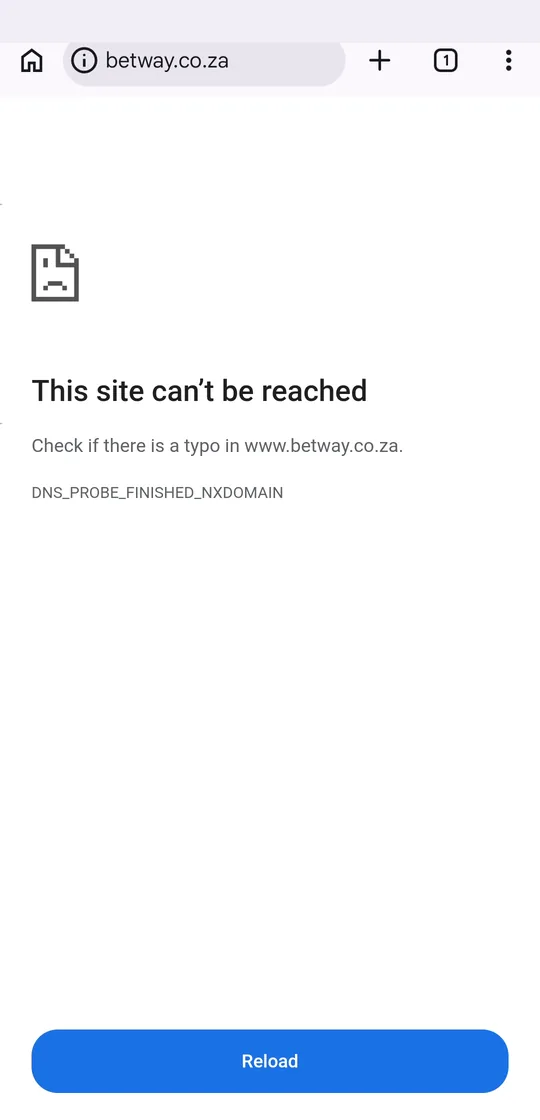
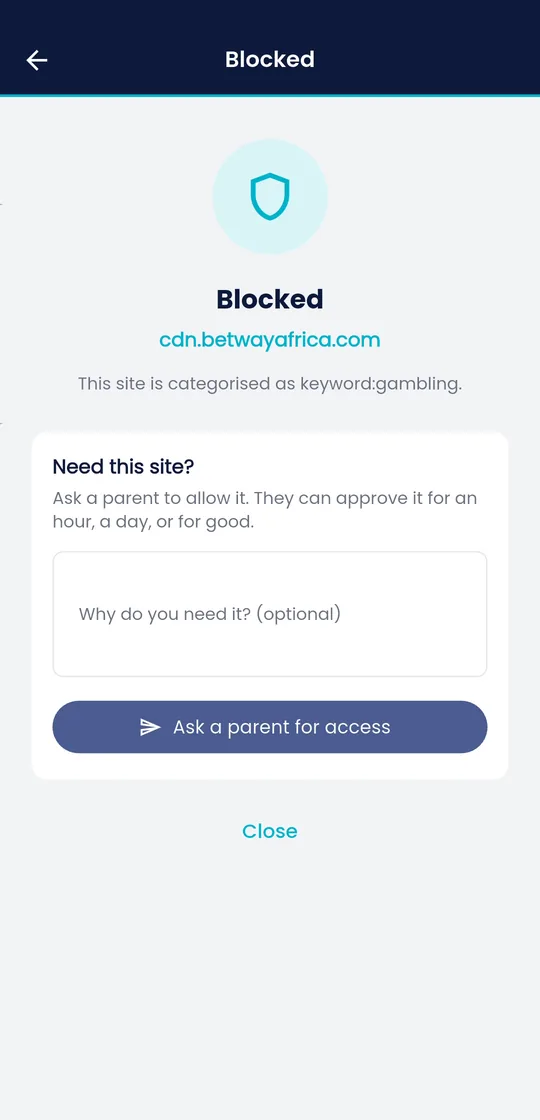
- Because Fyltec filters at the DNS level, it applies to every browser and app on the device, not just the default one, so an extra browser is still filtered.
- Still restrict new installs via Screen Time or Family Link, and remove browsers you didn’t sanction, so kids can’t hunt for one with its own DNS settings.
- Disable in-app browser “open in” tricks where you can, though device-level DNS filtering already covers in-app browsers.
4. Control second accounts and profiles
Switching to a second Google account, a separate user profile, or a guest mode can escape controls tied to the primary account. To close it:
- On Android, disable the ability to add users or accounts through Family Link, and turn off guest/secondary user profiles.
- On iOS, lock account and passcode changes in Screen Time so a child can’t sign out and set the phone up fresh.
- Keep the device’s admin passcode private, reused or guessed passcodes are the quiet way most “second account” bypasses actually happen.
5. Reduce the motivation to bypass
Every technical control above buys you time, not permanence. What lasts is a child who doesn’t feel the need to fight the setup. This is the mentoring angle, and the research behind it is consistent: kids who understand and have a say in their limits attempt fewer workarounds.
- Be transparent. Tell your child what’s filtered and why. Hidden monitoring, when discovered, is exactly what turns a cooperative teen into a determined one.
- Make requests easy. If getting a site or app unblocked is a quick, respectful conversation, bypassing loses its appeal. You want to be the person who grants access, not an obstacle to route around.
- Graduate the rules by age. Loosen controls as trust grows. A 15-year-old under 8-year-old rules will bypass them on principle, and they’d be right to feel patronised.
- Respond calmly when it happens. A bypass attempt is information, not betrayal. Treat it as a signal that a rule needs discussing, and you’ll learn more than any log ever tells you. If your child has disabled a setting, our guide on what to do when a child disables safety settings walks through a non-punitive response.
Fyltec is built for exactly this balance: a Fyltec lock pauses the internet only, so calls and SMS keep working, a boundary, not a total cut-off that breeds resentment. Tools support your parenting; the trust you build is what actually holds.
Not sure how to set this up for your family? Get in touch with our team and we’ll help you close the gaps.
Frequently asked questions
Can my child completely defeat parental controls?
A determined, technically-capable teen with enough time can get around most consumer tools eventually, no product can promise otherwise. The realistic aim is to close the easy routes (VPNs, DNS changes, extra browsers, second accounts) so bypassing takes real effort, and to reduce the motivation to try through openness and age-appropriate rules.
Does device-level filtering stop the “extra browser” trick?
Yes. Because Fyltec filters at the DNS level, it applies across every browser and app on the device, so installing a second browser doesn’t escape it. It’s still worth restricting new installs, since some browsers ship their own DNS settings that a child could try to change.
Should I monitor secretly to catch bypass attempts?
Generally no. Researchers like Heitner and Livingstone find that secret monitoring, once discovered, damages trust and increases determined workarounds. Transparency about what you filter and why, paired with a calm response when a child does test the limits, reduces bypass attempts more reliably than surveillance.