
How to block websites and apps without daily arguments
23 July 2026 · James Pearson
Short answer: Block websites and apps by filtering whole categories of unsafe content (adult, gambling, malware) rather than chasing individual URLs, then add a small allow-list of sites your child genuinely needs. Use per-child rules so a 7-year-old and a 14-year-old get different limits, and, this is the part most guides skip, explain why the rules exist. Category filtering plus a short conversation reduces arguments far more than a longer blocklist ever will.
Because a good filter works at the DNS layer, it can block unsafe content inside apps too, not just in the browser. That matters, because most of what worries parents (adult content, gambling, scams) reaches kids through apps, in-app browsers and search, not a neatly typed web address.
1. Start with categories, not individual sites
Trying to block the internet one site at a time is a losing game, new domains appear faster than anyone can list them. Instead, block by category. A DNS-based filter like Fyltec checks every request against maintained blocklists and refuses the unsafe ones (adult, gambling, malware, and similar), across every app on the phone.
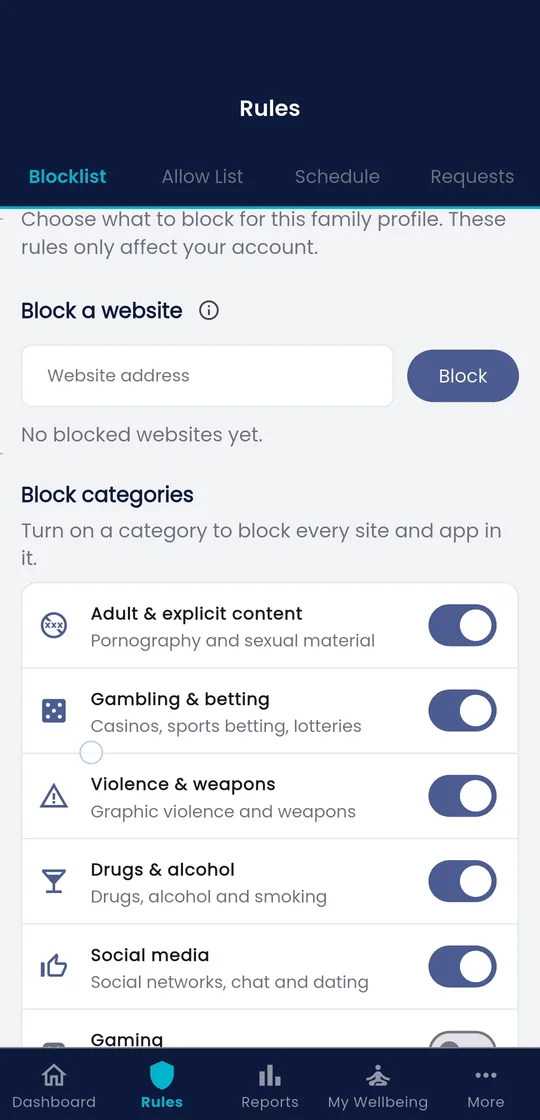
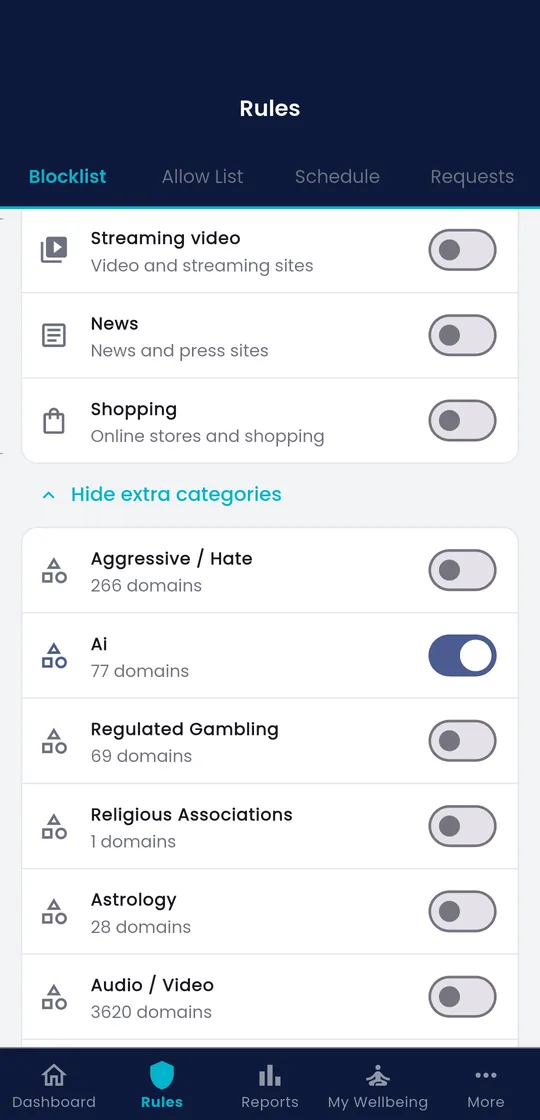
This is the single highest-leverage move you can make. Internet Matters and eSafety both recommend category-level filtering as the foundation of any setup, precisely because it keeps working as the web changes. Turn on the categories that fit your family’s values and your child’s age, and you’ve covered the large majority of risk without micromanaging.
For a wider tour of the layers involved, see the complete guide to parental controls.
2. Add a short allow-list for the sites they need
Category filtering occasionally catches something legitimate, a school portal, a hobby forum, a research site. Rather than loosening a whole category, add that specific site to an allow-list. Allow-lists let you keep the filter strict while making narrow, deliberate exceptions.
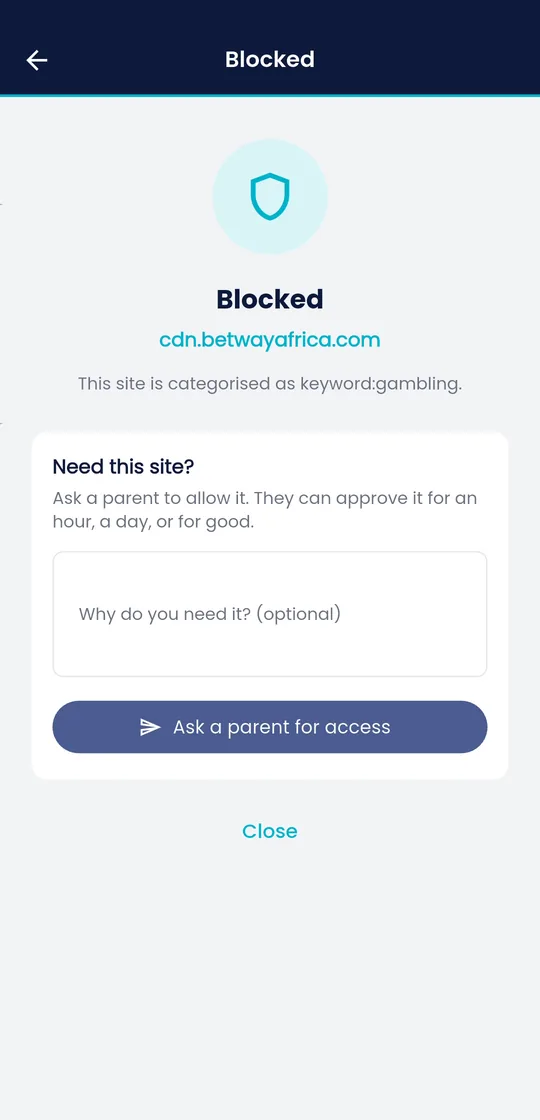

Keep the list short and build it with your child. When they hit a wrongly blocked site, treat it as a request, not a battle: “Send me the link and I’ll add it.” This flips the dynamic, you become the person who unlocks useful things, not only the one who blocks. Common Sense Media’s guidance echoes this: controls work best when kids understand they can ask for exceptions.
3. Block specific apps and set schedules
Some apps aren’t unsafe by category but still don’t fit a school night, a game, a social feed. For those, use screen time schedules rather than outright bans where you can. Fyltec’s Bedtime and Focus schedules (Premium) pause internet access for chosen windows (homework time, after lights-out) so the phone stops being a distraction without you policing it in the moment.
When you do need a hard stop, a Fyltec lock pauses the internet only, calls and SMS keep working, so your child can still reach you or be reached in an emergency. That distinction matters: a lock is a boundary, not a punishment that cuts them off entirely.
4. Set per-child rules
A single household rule rarely fits every child. The American Academy of Pediatrics recommends a family media plan tailored by age and stage rather than one blanket policy. In practice that means:
- Younger children (under ~10): strict category filtering, a very short allow-list, and generous scheduled downtime. Simplicity is kindness at this age.
- Tweens (~10-13): filtering stays on, but widen the allow-list and involve them in choosing it. Start explaining the reasoning.
- Teens (~14+): shift toward mentoring. Loosen categories as trust grows, keep safety-critical ones (adult, gambling, malware) on, and make the rules negotiable rather than imposed.
Fyltec lets you apply different rules to each child’s device, so the limits grow up as your kids do.
5. Reduce conflict by mentoring, not surveillance
The reason blocking causes arguments is usually not the block itself, it’s the feeling of being policed. Researchers who study this, including Devorah Heitner and Sonia Livingstone, consistently find that heavy-handed monitoring erodes trust and pushes kids to hide their activity, while open conversation builds the judgement they’ll need when the controls eventually come off.
There’s genuine debate among experts about how harmful screens are, Jonathan Haidt and Jean Twenge argue the risks are serious and rising, while researchers like Candice Odgers and Jacqueline Nesi caution that the evidence is more mixed and context-dependent. You don’t have to resolve that debate to act sensibly. Focus on what and when rather than raw hours, keep the safety-critical categories firmly on, and treat everything else as a conversation.
Practical ways to lower the temperature:
- Name the categories you block and why (“gambling and adult sites, because those aren’t built for kids”) rather than presenting a mysterious wall.
- Make requests easy. A fast, no-drama way to ask for an exception removes most of the incentive to fight.
- Revisit rules on a schedule, not only after a blow-up. “Let’s look at your limits again on your birthday” signals that the rules grow with them.
Tools like Fyltec support parenting; they don’t replace it. The filter handles the tireless, repetitive job of screening millions of domains so you can spend your energy on the conversations only a parent can have.
Ready to set age-appropriate filtering for each child? Start your 7-day free trial and configure per-child rules in minutes.
Frequently asked questions
Does blocking work inside apps, or only in the browser?
Both. Because Fyltec filters at the DNS level, it screens the requests apps make too, so unsafe content is blocked inside apps, in-app browsers and search results, not just when your child types a web address. That’s important, since most risky content today arrives through apps rather than the open web.
What if the filter blocks a site my child actually needs?
Add it to your allow-list. Allow-lists make narrow, deliberate exceptions without loosening a whole category, so you can keep the filter strict while letting through a school portal or a legitimate hobby site. Treat each request as a quick conversation rather than a conflict.
Won’t strict blocking just cause more arguments?
It can, if it feels like surveillance. The evidence from researchers like Heitner and Livingstone is that explaining your reasoning, making exceptions easy to request, and revisiting rules as kids grow reduces conflict far more than a longer blocklist. Block the safety-critical categories firmly, and keep the rest a conversation.