
How to block social media during school nights
23 July 2026 · James Pearson
Short answer: Rather than banning social media outright, put it on a schedule, off during homework hours, off after bedtime, and lighter on school nights than at weekends. The most reliable way to do this is to block the whole Social Media category on a recurring timer at the device level, so it happens automatically instead of turning into a nightly argument. Then explain the “why” to your teen, because a rule they understand is a rule that survives.
Social media isn’t the enemy, it’s where friendships live, and cutting it off completely often backfires. But late-night scrolling wrecks sleep and homework, and expecting a 14-year-old to close the app through willpower alone isn’t realistic. Scheduling solves the real problem: not whether they use it, but when.
1. Decide the windows, not a total ban
Before touching any settings, sketch out when social media should be off. Favour limiting and scheduling over outright bans, the goal is protecting sleep and focus, not eliminating a whole part of your teen’s social world.
A workable school-night pattern:
- Homework block: off from, say, 4pm to 6pm (or whenever homework happens).
- Bedtime block: off from an hour before bed until morning, the single biggest win for sleep.
- School hours: off during class if the device goes to school.
- Weekends: looser. Signalling that school nights are different from Friday nights makes the whole thing feel fair rather than punitive.
Write these down. You’ll enter them once and then forget about them.
2. Block the Social Media category on a schedule
Doing this app-by-app is a losing game, there’s always another new platform. Blocking by category covers the whole class of apps at once, including ones you haven’t heard of yet.
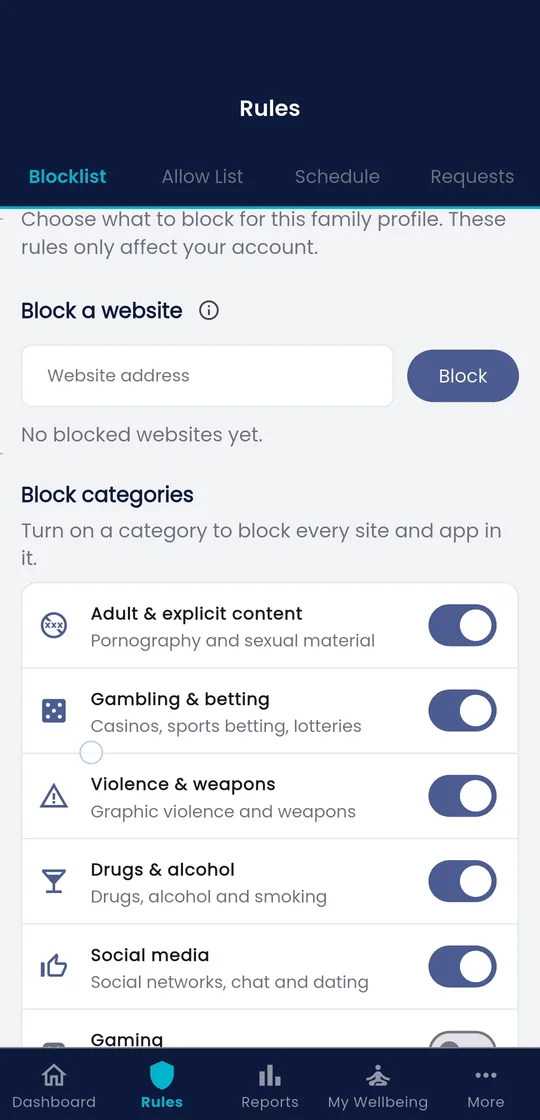
With Fyltec:
- Open the app and choose your child’s device.
- Go to content filtering and enable the Social Media category.
- Attach it to a schedule rather than an always-on block, set the homework and bedtime windows you decided in step 1.
- Save. The blocks now apply automatically on the days and times you chose.
Because Fyltec filters at the DNS level, this works inside apps, not just in a browser, so it holds even when your teen opens the native Instagram or TikTok app. And because a “lock” only pauses internet access, calls and texts still go through: your teen can always reach you, and you’re not confiscating a phone, just pausing an app.
3. Leave room for the exceptions
Rigid rules invite rule-breaking. Build in a little give:
- An allow-list for anything essential, a school portal, a messaging app used for group projects, so blocking social media doesn’t accidentally block schoolwork.
- Custom schedules (a Premium feature) let you handle real life: a later cut-off on a Saturday, an exam-week clampdown, a lighter touch in the holidays.
- A way to ask. Tell your teen how to request an exception (“text me and I’ll lift it for an hour”). Having a legitimate route reduces the incentive to find a workaround.
4. Pair the schedule with a conversation
The schedule is the easy part. Whether it lasts depends on the talk you have around it. Don’t roll it out silently, that reads as surveillance, and it teaches nothing.
Say what you’re doing and why: “Late scrolling is hurting your sleep, so social apps switch off an hour before bed. It’s not because I don’t trust you, everyone’s brain does this, mine included.” Where you can, negotiate the details together; a teen who helped set the bedtime hour is far more likely to respect it. As Anya Kamenetz and Devorah Heitner both stress, the aim is a young person who can eventually self-regulate, the schedule is training wheels, not a cage.
Revisit it. As your teen shows they can manage evenings well, loosen a window and tell them you’re doing it. That visible loosening is how a control becomes trust.
5. Model it yourself
The rule lands harder if you follow a version of it. Phones out of the bedroom, no scrolling at dinner, your own attention where you say theirs should be. You don’t have to be perfect, but a parent who scrolls through the “no phones at bedtime” rule has already lost the argument.
Frequently asked questions
Won’t my teen just find a way around the block?
Some will try. Category-level DNS filtering is harder to dodge than a single-app toggle, and pairing it with an honest conversation removes much of the motivation to. If your teen puts real effort into circumventing it, treat that as a signal to talk, not just to tighten the screws.
Should I block social media completely instead of scheduling it?
Usually no. A total ban tends to breed secrecy and cuts kids off from friendships that matter to them. Scheduling protects the things that actually suffer, sleep and homework, while leaving room for the social benefits. Reserve full blocks for specific, temporary situations you’ve discussed.
What about their friends’ messages during a block?
Because Fyltec’s block only pauses internet-based apps, ordinary calls and SMS still work, so your teen isn’t cut off in an emergency. For essential group-project chats, add that app to an allow-list so it stays available during blocked windows.
Fyltec offers a 7-day free trial, so you can set up schedules and category blocks and see how they fit your household before paying anything.